
Pro

Auto Smelter
.litematic · .schem
Every build here exists as a layer-by-layer guide and, with Pro, as a .litematic file for the Litematica mod. Preview it in the viewer, then load it in the game and build over the ghost.
Works with Java and Bedrock, on PC, console, phone and tablet. No mods needed.
Pro downloads each build as .litematic and .schem. Everyone can preview the layers and the materials first.
.litematic · .schem

.litematic · .schem

.litematic · .schem

.litematic · .schem

.litematic · .schem

.litematic · .schem

.litematic · .schem

.litematic · .schem

.litematic · .schem

.litematic · .schem

.litematic · .schem

.litematic · .schem

.litematic · .schem

.litematic · .schem

.litematic · .schem

.litematic · .schem

.litematic · .schem

.litematic · .schem

.litematic · .schem

.litematic · .schem

.litematic · .schem

.litematic · .schem

.litematic · .schem

.litematic · .schem

.litematic · .schem

.litematic · .schem

.litematic · .schem

.litematic · .schem

.litematic · .schem

.litematic · .schem

.litematic · .schem

.litematic · .schem

.litematic · .schem

.litematic · .schem
No builds with this difficulty here.
Missing a build? Request it
Copy the .litematic file into the `schematics` folder inside your Minecraft game folder. Create the folder if it is missing.
In the game, open the Litematica menu (the default key is M) and choose Load Schematics. Select the file and load it.
Choose a position with the placement tools. A translucent ghost of the build appears in the world, and the material list shows what is still missing.
Litematica is a client-side mod for Minecraft Java Edition. It does not change the world by itself. It shows a schematic as a translucent overlay, so you can see where every block goes and place the blocks yourself in survival.
The overlay is useful because it never lies about position. You walk up to a wall, see a ghost block, and fill the gap. Blocks that match turn solid, and the ones that are wrong are marked.
The material list adds up every block in the schematic and compares it with what you carry, so you know what to collect first. The schematic verifier checks a placed build against the file and shows missing or wrong blocks. It is a good last step before you call a build finished.
If you only want to see what is inside a file before installing anything, drop it into the schematic viewer.
In Litematica you can show one layer at a time as well. These maps show the same slices for comparison.
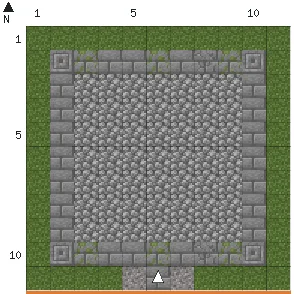
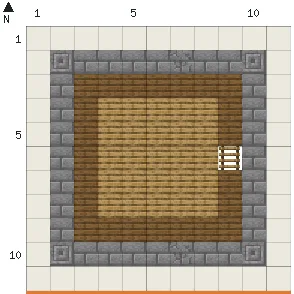
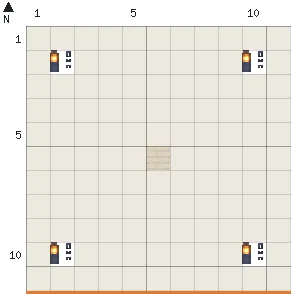
Our .litematic files are saved for Minecraft Java Edition 1.20.1 (data version 3465), and every build uses only blocks that exist in that version. Use the Litematica release that matches your game version. Block names and textures in the viewer come from newer game data, so you see the blocks in the language of your choice.
The viewer and the file are two views of the same build. The material list in the viewer matches the list Litematica will show, and the layers match the layer view in the mod. Plan your trip to the quarry in the browser, then place the build in the game.
Pro gives you the .litematic and .schem downloads for every build. Free builds show their layers in the viewer. If you use WorldEdit instead, see the general Minecraft schematics page. Not sure where to start? Try the castle watchtower, a free build with a compact footprint.
The free builds show every layer. Pro adds .litematic and .schem files, printable PDFs and all layers of the other builds.
$0
No account needed to start
$4.99 / month
Billed every month, cancel any time
$14.99 / year
$1.25 a month, billed once a year
Prices in US dollars. Payments are handled by Paddle. You can cancel in your account at any time.
In the `schematics` folder inside your Minecraft game folder. Litematica lists the files from that folder in its Load Schematics menu.
Open the Litematica menu, choose Load Schematics, select the file and load it. Then place it where you want to build. A translucent copy appears in the world.
A list of every block in the schematic with counts, which Litematica can compare with your inventory. Our viewer shows the same list with stack counts before you open the game.
The schematic verifier compares the build in your world with the schematic and marks missing or wrong blocks. Use it after you finish to catch a stair that faces the wrong way.
The files are saved for Java Edition 1.20.1 (data version 3465) and use only blocks from that version. Pick the Litematica build for your game version.
The viewer, the layers of free builds and all material lists are free. File downloads are part of Pro.
Yes. Drop a file up to 8 MB into the schematic viewer. It is read for your request and not stored.
Open a build, read its layers and decide what to collect.
Preview a build