
FreeEarly game

These Minecraft schematics for farms are compact survival designs: a fenced wheat field you can build in an evening and automatic farms that harvest themselves. Read the layers in the browser, gather the materials, then build or load the file.
Works with Java and Bedrock, on PC, console, phone and tablet. No mods needed.
Every farm has a layer-by-layer viewer, a 3D view and a full material list. Some of them use redstone, and a build can appear a little later than the others, on a fixed date.
No builds with this difficulty here.
Missing a build? Request it
Open a farm and read the material list with stack counts. The wheat farm is 13 × 13 blocks and 4 layers high, so a flat patch of ground next to your base is enough.
Step through the layers with the slider and turn on the layer below. Water, farmland and hoppers go in first, because they sit under everything else.
Seeds and sugar cane go in at the very end. For the automatic farms, test the redstone with one row before you plant the rest.
These are compact survival farms for crops. The wheat farm is a fenced 9 × 9 field of farmland around one water block, with wheat, carrots, potatoes and beetroots, a path to walk round the crops, a gate and lanterns. It has no redstone and it is free with every layer.
The sugar cane farm and the pumpkin and melon farm are automatic. An observer notices that a plant has grown, a piston breaks it, and hoppers carry the drops into a chest. They are built from observers, pistons, hoppers and a little redstone dust.
There are no mob farms and no iron farms here. If you need those, look for a design made for your game version. What you get is the kind of farm that feeds you in survival and looks tidy next to a house.
The files are .litematic and .schem for Java Edition 1.20.1 and newer, and .mcstructure and .mcpack for Bedrock. The redstone designs follow Java Edition rules, so test them in Bedrock before you copy a whole row.
The floor with the path, the farmland and the water block, then the crop rows and the fence, then the top of the scarecrow. The viewer shows the same maps for every farm.
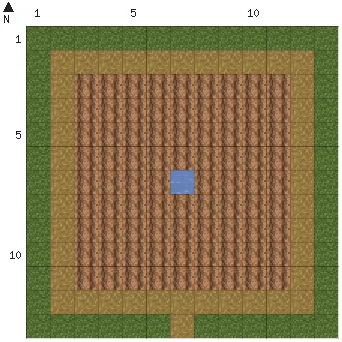
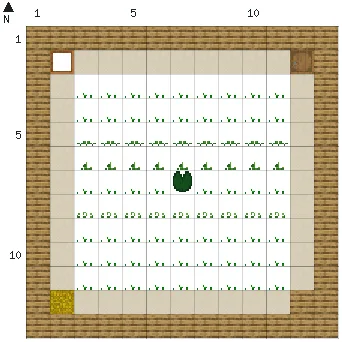
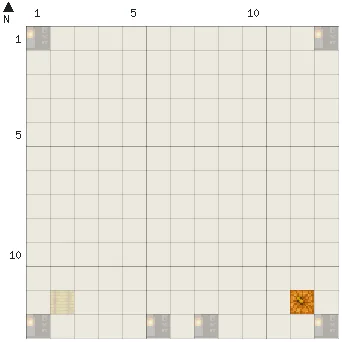
A farm works only if the water, the soil and the hoppers sit in the right places. The layer map shows each one from above, so you can see where the water block stands and which farmland cells it keeps moist: one source block reaches four blocks in every direction.
Click a material in the list and every cell that uses it lights up. That makes it easy to count hoppers or find the single lily pad in the water. Hover over a cell to read its block and its properties, for example which way a piston or an observer faces.
For the automatic farms, build one repeating unit first. If the observer fires and the piston pushes, repeat it along the row.
The free builds show every layer. On the others you see the first 3 layers and the full material list. Pro opens every layer, the 3D view, the printable PDF and the Java and Bedrock files.
$0
No account needed to start
$4.99 / month
Billed every month, cancel any time
$14.99 / year
$1.25 a month, billed once a year
Prices in US dollars. Payments are handled by Paddle. You can cancel in your account at any time.
A wheat farm with four crops, an automatic sugar cane farm and an automatic pumpkin and melon farm. They are compact survival farms. There are no mob farms and no iron farms.
Yes. It shows every layer and the material list for everyone. The PDF and the file downloads are part of Pro.
The wheat farm only uses plain blocks, so it works. The redstone designs follow Java Edition rules. On Bedrock, build one observer and piston first and test it before you copy the row. Bedrock files come as .mcstructure and .mcpack with Pro.
Water hydrates farmland up to four blocks away in every direction. The field is 9 × 9, so a single block in the middle reaches every farmland block.
Pro gives you .litematic for Litematica and .schem for WorldEdit, both for Java Edition 1.20.1 and newer. For Bedrock there are .mcstructure and .mcpack.
No. You can place every block by hand in survival. Litematica or WorldEdit only help if you want to paste the file.
Pick a farm, check its materials and place the first layer.
Browse the farms