
Pro

Auto Smelter
.mcstructure · .mcpack
Every build here comes as a .mcstructure file and as a .mcpack behavior pack for Bedrock. Read the layers in the browser first, then load the build into a creative world on Windows, Android or iPhone.
Works with Java and Bedrock, on PC, console, phone and tablet. No mods needed.
Pro downloads each build as .mcstructure and .mcpack. Everyone can read the layers and the material list first.
.mcstructure · .mcpack

.mcstructure · .mcpack

.mcstructure · .mcpack

.mcstructure · .mcpack

.mcstructure · .mcpack

.mcstructure · .mcpack

.mcstructure · .mcpack

.mcstructure · .mcpack

.mcstructure · .mcpack

.mcstructure · .mcpack

.mcstructure · .mcpack

.mcstructure · .mcpack

.mcstructure · .mcpack

.mcstructure · .mcpack

.mcstructure · .mcpack

.mcstructure · .mcpack

.mcstructure · .mcpack

.mcstructure · .mcpack

.mcstructure · .mcpack

.mcstructure · .mcpack

.mcstructure · .mcpack

.mcstructure · .mcpack

.mcstructure · .mcpack

.mcstructure · .mcpack

.mcstructure · .mcpack

.mcstructure · .mcpack

.mcstructure · .mcpack

.mcstructure · .mcpack

.mcstructure · .mcpack

.mcstructure · .mcpack

.mcstructure · .mcpack

.mcstructure · .mcpack

.mcstructure · .mcpack

.mcstructure · .mcpack
No builds with this difficulty here.
Missing a build? Request it
Turn on cheats in a creative world and run `/give @s structure_block`. Place the block, set Mode to Load, press Import, pick the .mcstructure file and press Load.
Tap the .mcpack file and open it with Minecraft. The game imports it. Then edit your world, activate the pack under Behavior Packs and turn on cheats.
Stand where the build should start and type the command from the pack description, for example `/structure load mineblueprints:oak_starter_house ~ ~ ~`.
A .mcstructure file is the format of the Bedrock structure block. On Windows, a structure block in Load mode has an Import button that reads the file straight from your folders. That is the quickest way in, and it needs nothing else.
Phones and tablets have no Import button, so each build also comes as a .mcpack: a small behavior pack with the structure already inside, a manifest and an icon. Minecraft opens a .mcpack by itself and adds it to your packs. You do not have to build folders or write a manifest by hand.
Both ways need cheats in the world. Cheats switch off achievements in that world for good, so load builds into a copy of your survival world or into a fresh creative world, then rebuild them in survival from the layer maps if you want the achievements.
The file places the whole build at once. To build it yourself in survival, follow the layers instead.
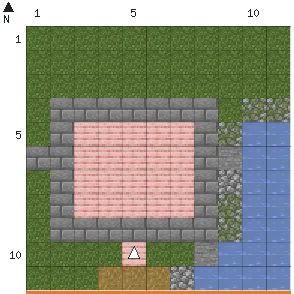
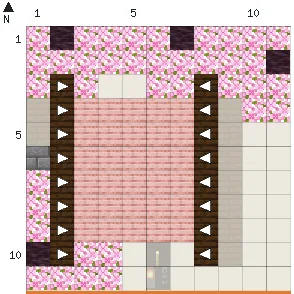
Our builds are drawn in Java block states, and every block is converted to its Bedrock name and states for the current Bedrock release. Stairs keep their direction, slabs their half, logs their axis. Beds keep their colour, banners their base colour and flower pots their plant.
Chests and barrels arrive empty and signs blank, the same as in the Java files. If you swap the wood or the stone in the viewer before you download, the Bedrock files use your palette too.
Consoles (Xbox, PlayStation, Switch) cannot open files. Load the build on a Windows PC or a phone, upload that world to your Realm with Replace World, and everyone on the Realm sees it. Or keep the layer maps open in a browser next to the TV and build by hand: that works on every device without any file.
The free builds show every layer. Pro adds .mcstructure and .mcpack files, the Java files, printable PDFs and all layers of the other builds.
$0
No account needed to start
$4.99 / month
Billed every month, cancel any time
$14.99 / year
$1.25 a month, billed once a year
Prices in US dollars. Payments are handled by Paddle. You can cancel in your account at any time.
In a world with cheats on, run `/give @s structure_block` and place the block. Set Mode to Load, press Import and pick the file. Its name and size fill in, then press Load. Import only works in your own world.
Yes, with the .mcpack. Open it with Minecraft to import it, activate it under Behavior Packs in your world settings, turn on cheats and type the `/structure load` command shown in the pack description.
`mineblueprints:` plus the English name of the build with underscores, for example `mineblueprints:oak_starter_house`. The pack description in the game shows the full command.
Consoles cannot import files. Load the build on a PC or phone and upload the world to a Realm, or join a world a friend hosts. You can always follow the layer maps in a browser and build by hand.
Yes. Both the structure block and `/structure load` need cheats, and cheats switch off achievements in that world. Use a copy of the world or a creative world.
No. A Bedrock structure can be up to 64 × 384 × 64 blocks, and none of our builds is wider than 40 blocks.
The layer maps, the 3D view and every material list are free. The .mcstructure and .mcpack downloads are part of Pro, together with the Java files and the PDF.
Open a build, check its size and materials, then bring it into your Bedrock world.
Preview a build