
Pro

These Minecraft house blueprints are stacks of layer maps with a material list that tells you how many stacks to bring. Start with an 11 × 11 cabin and work up to a 36 × 30 mansion.
Works with Java and Bedrock, on PC, console, phone and tablet. No mods needed.
Every card shows the footprint, the layer count and the difficulty. Free builds open with every layer, the others open the first three.


No builds with this difficulty here.
Missing a build? Request it
Easy houses fit in 11 × 11 blocks. Medium houses run up to 20 × 20, and the hard ones have the trickiest shapes or the most layers.
Layer 1 is the footprint. The layers after it stack the walls, with door and window gaps visible on the map. A triangle on a stair points up the slope.
The material list adds up the whole house and each single layer, with stack counts of 64. Collect everything first, so you do not leave the roof half done to go mining.
Look at the numbers on the card before you place a block. The footprint tells you how much flat ground to clear: an 11 × 11 house needs 121 blocks, plus room for a path or a garden. The layer count is the height. Nine layers means nine blocks from the lowest course to the ridge.
Check the floor height next. Three blocks of clear height between floor and ceiling is a common choice, because it fits a door and leaves space for a lantern. For a taller room, add a layer and move the next floor up. The slider shows you where the beams sit.
The roof pitch sets the look. Stairs give a 45° slope, one block up for every block across, and slabs give a flatter roof. On a stair roof each layer moves inward by one block, so you can count to the ridge before you get there. Spruce Cabin is a clean first example.
Last comes lighting. Hostile mobs spawn in the dark, so put a torch (light 14) or a lantern (light 15) in every room before you plan the furniture.
A cabin at the foundation, halfway up and under the roof. Open the build to see every layer in between.
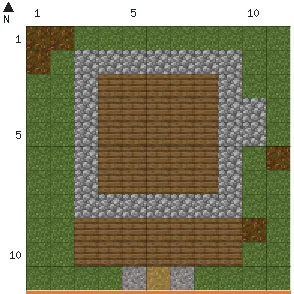
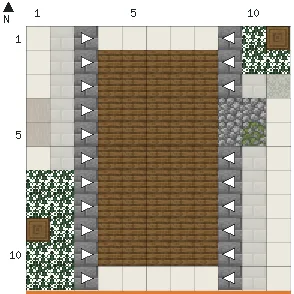
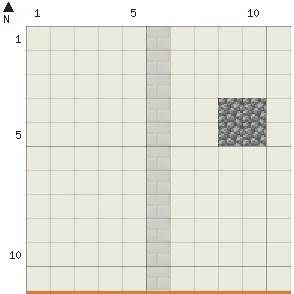
Start at the bottom. The easy houses, such as Oak Starter House (345 blocks) and Birch Cottage, fit in 11 × 11 and use a short list of materials: planks, logs, stairs and cobblestone. You can finish one in an evening, and the same plan works for a first survival base. More small ones are on the starter houses page.
Medium houses add size and detail. Medieval Timber House is 15 × 13 blocks and 15 layers tall. Modern White House has 966 blocks of mostly white, gray and black concrete. Here the material list matters more, because every extra material means another trip to the chest.
The hard houses mostly need patience. The mansion covers 36 × 30 blocks and holds 5,619 blocks in total, about 88 stacks. Build the shell first, then the rooms, and tick off one layer at a time. The viewer remembers the layer you reached.
Six houses are free with every layer. The other houses open their first three layers and the full material list. Pro opens every layer and adds the printable PDF and the .litematic and .schem files.
$0
No account needed to start
$4.99 / month
Billed every month, cancel any time
$14.99 / year
$1.25 a month, billed once a year
Prices in US dollars. Payments are handled by Paddle. You can cancel in your account at any time.
A blueprint shows a house one layer at a time, seen from above, so you know the position of every block. Each house here also has a 3D view and a material list.
Take Oak Starter House or Spruce Cabin. Both are free, fit in 11 × 11 blocks and have 345 and 484 blocks.
A starter house uses 345 to 520 blocks. Medium houses run from about 800 to 1,200 blocks, and the mansion has 5,619. The list in each build shows the exact count per material.
Yes, with Pro. The PDF has a cover, the material list and one page per layer. Pro also gives you the .litematic and .schem files. Pro Monthly costs $4.99, Pro Yearly $14.99.
Yes. The maps use real block names, so you can change oak planks for spruce or birch. Keep the stairs and slabs in the same position and the shape stays the same.
Every house uses only blocks from Minecraft Java Edition 1.20.1, so it also builds in newer versions.
Open a blueprint, check the footprint and lay the first row of blocks.
Start building