
Pro

Auto Smelter
.litematic · .schem
A schematic is a file that stores a build block by block. Here every blueprint is a schematic you can read layer by layer for free, and with Pro you can download it as .litematic or .schem.
Works with Java and Bedrock, on PC, console, phone and tablet. No mods needed.
Every build below exists as a viewer page, a PDF and two schematic files. The free builds can be viewed in full.
.litematic · .schem

.litematic · .schem

.litematic · .schem

.litematic · .schem

.litematic · .schem

.litematic · .schem

.litematic · .schem

.litematic · .schem

.litematic · .schem

.litematic · .schem

.litematic · .schem

.litematic · .schem

.litematic · .schem

.litematic · .schem

.litematic · .schem

.litematic · .schem

.litematic · .schem

.litematic · .schem

.litematic · .schem

.litematic · .schem

.litematic · .schem

.litematic · .schem

.litematic · .schem

.litematic · .schem

.litematic · .schem

.litematic · .schem

.litematic · .schem

.litematic · .schem

.litematic · .schem

.litematic · .schem

.litematic · .schem

.litematic · .schem

.litematic · .schem

.litematic · .schem
No builds with this difficulty here.
Missing a build? Request it
With Pro, press .schem or .litematic on a build page. Put the file in the schematics folder of WorldEdit or Litematica.
In WorldEdit type `//schem load name`. In Litematica open the Load Schematics menu, pick the file and load it.
WorldEdit: stand where the build should go and type `//paste`. Litematica: place the ghost build, then use its material list.
A schematic stores the blocks of a build and where each one sits. Three file types are in use. .schem is the Sponge format that WorldEdit and several other tools use. .litematic belongs to the Litematica mod and keeps the same data in its own layout, plus a material list for the mod. .schematic is the old WorldEdit format from before Minecraft 1.13, which uses numeric block ids and cannot describe modern blocks.
The short rule: use .schem if you paste builds with WorldEdit, and .litematic if you want the ghost overlay of Litematica while you build in survival. If you only have an old .schematic file, load it in an old WorldEdit and save it again as .schem.
Our schematic viewer opens .litematic and .schem files and shows what is inside, which helps when a file from the internet has no preview. It does not open the old .schematic format.
The viewer slices a schematic into layers. This example shows the lighthouse at the base, midway and at the lamp room.
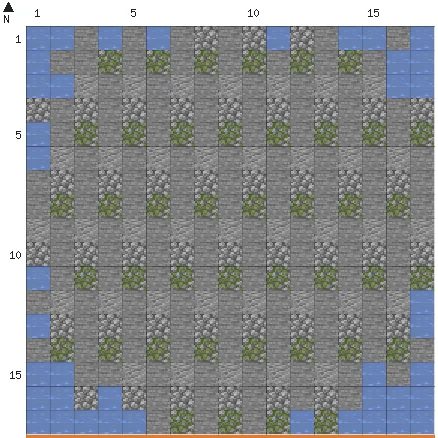
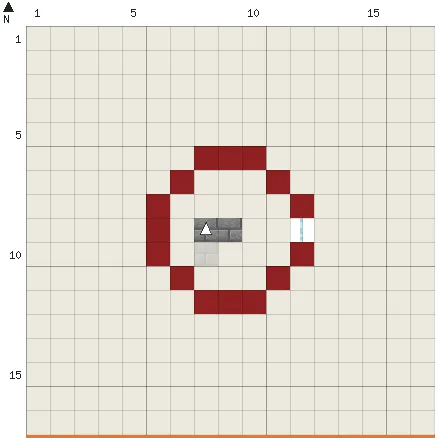
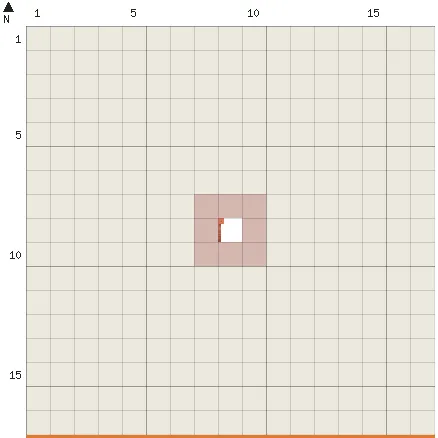
Each blueprint has two files. The .schem is a Sponge version 2 file and the .litematic is a Litematica file, and both are saved for Minecraft Java Edition 1.20.1, so they also open in newer versions. They hold the blocks and their states, such as stairs facing and door halves. Chests, signs and other block entities carry no contents.
The builds are original works of MineBlueprints, written block by block, not copies of other people's files. You can build them in your worlds and show them in videos and screenshots. Reselling or republishing the files, PDFs or maps is not allowed.
Try it first with a free build such as the Lighthouse, which opens every layer without an account. Pro adds the PDF with the cover, the material list and one page per layer, plus both schematic files, for every blueprint.
Viewing is free. Pro opens all layers, the 3D view, printable PDFs and the .litematic and .schem downloads.
$0
No account needed to start
$4.99 / month
Billed every month, cancel any time
$14.99 / year
$1.25 a month, billed once a year
Prices in US dollars. Payments are handled by Paddle. You can cancel in your account at any time.
A file that stores the blocks of a build and their positions, so it can be pasted into a world again with WorldEdit or placed as an overlay with Litematica.
.schem is the Sponge format used by WorldEdit. .litematic is the format of the Litematica mod, with a material list and a ghost overlay. Both store blocks and states.
Copy the file to the schematics folder of WorldEdit, run `//schem load name`, stand where you want the build and run `//paste`. Use `//undo` if the spot was wrong.
Put it in the schematics folder of the Litematica mod, open the Load Schematics menu, select the file and place it. The material list in the mod shows what is missing.
Not in our viewer. Load it in WorldEdit for an older version and save it again as .schem.
They are original builds of MineBlueprints. Every block is placed by us, and each build only uses blocks from Minecraft Java Edition 1.20.1.
Not the .schem and .litematic files: they are Java Edition formats. Each build also comes as a .mcstructure file and a .mcpack for Bedrock on Windows, Android and iPhone. The steps are on the Bedrock schematics page.
Open a build, check the layers and download the file with Pro.
Browse schematics