
Pro

Houses, castles, village builds, landmarks, farms and redstone machines. Each idea comes with a layer-by-layer viewer and a material list, so you can pick one and start placing blocks today.
Works with Java and Bedrock, on PC, console, phone and tablet. No mods needed.
Look through the pictures first. Open a build when something catches your eye.


No builds with this difficulty here.
Missing a build? Request it
Houses for a home, castles for a project, village builds for the details around them, landmarks for something to see from far away.
Open the material list and see which blocks dominate. Pick the one that fits the wood and stone you already have.
Follow the layers once, then swap the palette. The same shape looks different in spruce, birch or stone bricks.
Most players run out of build ideas at the moment the starter house is finished. The catalog is sorted to help with that. Houses cover 14 builds, from the small Oak Starter House to the large Mansion. Castles have five, from a watchtower to a courtyard castle. Village builds add a well, a stable, a greenhouse, a market stall, a smithy and a fountain. Landmarks give you a lighthouse, a windmill, a stone bridge, a boathouse and a wizard tower.
Think about what your world is missing. A survival world with one house needs a farm and a stable. A world with a castle needs a village below it. A coastline wants the lighthouse and the boathouse dock.
Choose by effort too. Easy builds, such as the Village Well, the Market Stall and the starter houses, fit in one evening. Hard ones, such as the Castle Keep, are weekend projects with thousands of blocks. The difficulty and the block count are on every card.
The Cherry Blossom House at the foundation, at mid height and at the roof. Open it to see every layer in between.
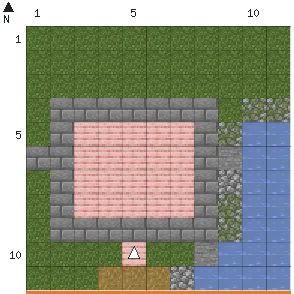
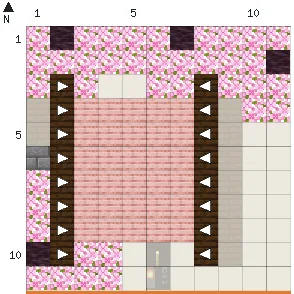
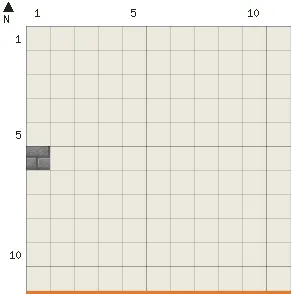
A blueprint is a shape, not a rule. Follow the layers once to learn the proportions, then change the materials. Planks, stairs, slabs, fences, doors and trapdoors all come in the same wood types, so a spruce house becomes a birch one by replacing each wood block with its relative. Cobblestone and stone bricks swap the same way.
The material list is your shopping list for the swap. Click a material in the viewer and every block of it lights up on the layer, so you see where it goes. Keep contrast: a pale wall wants a dark roof, and a dark frame wants a light infill.
If you own the files, WorldEdit can do the swap in one command, for example `//replace oak_planks birch_planks`. You can also open your own schematics in the schematic viewer. For ideas by style, see the medieval builds and the house blueprints.
The free builds show every layer. Pro adds every layer of the others, the 3D view, printable PDFs and downloadable schematic files.
$0
No account needed to start
$4.99 / month
Billed every month, cancel any time
$14.99 / year
$1.25 a month, billed once a year
Prices in US dollars. Payments are handled by Paddle. You can cancel in your account at any time.
Start with a small house, then add what your world needs: a farm, a stable, a village well. Once you have the resources, build a tower or a castle on a hill.
The Village Well, the Market Stall and the starter houses are easy builds. Each shows its size, block count and difficulty on the card.
Compare the block count and the material list with what you have. A build with 200 blocks takes one evening, one with several thousand takes a weekend.
Yes. Replace each block with the same kind in another material, for example spruce stairs with birch stairs. The viewer highlights every use of a block, so you can find them all.
Some builds are free with every layer. The others show their first three layers and the full material list. Pro unlocks the rest.
No. You can place the blocks by hand in Minecraft Java Edition 1.20.1 or newer. Pro adds .litematic and .schem downloads if you use Litematica or WorldEdit.